
Quickstart
Get started with Archestra Platform using Docker
3 min read
Run it locally to try!
We've prepared an all-in-one Docker image to make trying Archestra for the first time simple.
Linux / macOS:
docker pull archestra/platform:latest;
docker run -p 127.0.0.1:9000:9000 -p 127.0.0.1:3000:3000 \
   -e ARCHESTRA_QUICKSTART=true \
   -v /var/run/docker.sock:/var/run/docker.sock \
   -v archestra-postgres-data:/var/lib/postgresql/data \
   -v archestra-app-data:/app/data \
   archestra/platform;
Windows (PowerShell):
docker pull archestra/platform:latest;
docker run -p 127.0.0.1:9000:9000 -p 127.0.0.1:3000:3000 `
   -e ARCHESTRA_QUICKSTART=true `
   -v /var/run/docker.sock:/var/run/docker.sock `
   -v archestra-postgres-data:/var/lib/postgresql/data `
   -v archestra-app-data:/app/data `
   archestra/platform;
The UI and API are bound to 127.0.0.1, so you can open them locally at http://localhost:3000 and http://localhost:9000.
Once it's up, follow http://localhost:3000
Build Your First Agent Easy
- Go to MCP Registry, search for
microsoft__playwright-mcp, install it. - Archestra runs the MCP server in a Kubernetes cluster. To verify, run
kubectl get pods. - Go to Agents and create "Archestra Docs Reader Agent" with this system prompt:
You're using playwright to answer questions about Archestra based on /docs/ - While editing the agent, make sure to enable all
microsoft__playwright-mcptools for it. - Go to Model Providers (in the Studio sidebar) and add your preferred provider. You can connect commercial providers like OpenAI, Anthropic, or Google Gemini. For a free option, use Cerebras or a local Ollama instance.
- Go to Chat, choose the "Archestra Docs Reader Agent" and ask "How could I deploy Archestra?"
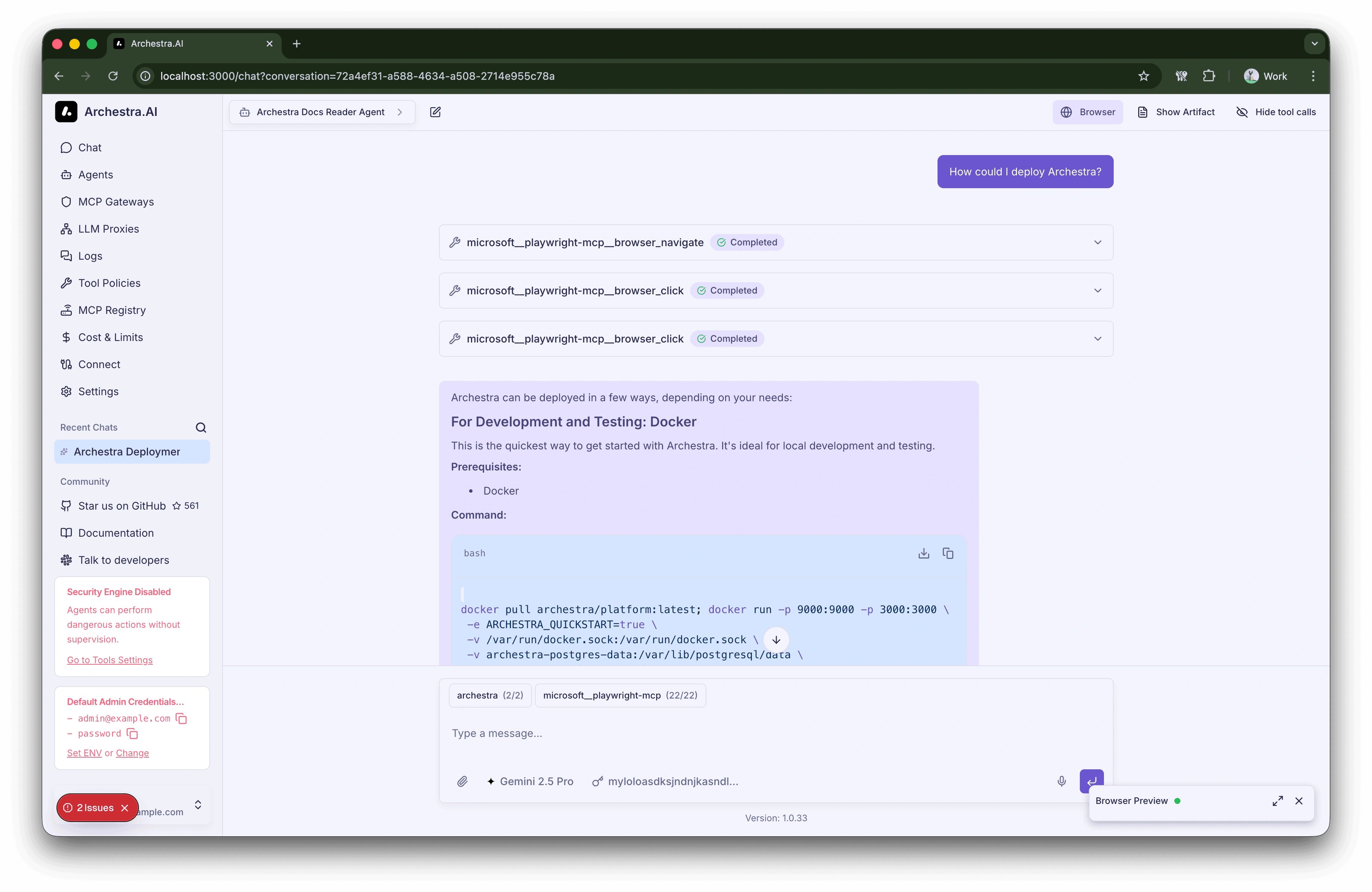
The agent navigates the website to answer the question.
Connect to Your Agent via MCP Gateway Advanced
Archestra is not just a Chat UI, it's a very capable MCP Gateway. Let's connect our "Archestra Docs Reader Agent" to Claude Code to make sure we can trigger it as an MCP server!
- Go to MCP Gateways, create a new one.
- Make sure to set "Archestra Docs Reader Agent" as a sub-agent.
- Save changes and Copy MCP configuration.
- Add MCP Gateway to your Claude. Here is my archestra config (your auth key will be different!):
{
  "mcpServers": {
    "archestra": {
      "url": "http://localhost:9000/v1/mcp/e1b0272c-3839-4575-a49d-aabb864d638d",
      "headers": {
        "Authorization": "Bearer arch_119220a7bfc485d66b678d3e9fb2db36"
      }
    }
  }
}
I converted it to the command for claude:
claude mcp add archestra "http://localhost:9000/v1/mcp/e1b0272c-3839-4575-a49d-aabb864d638d" --transport http --header "Authorization: Bearer arch_119220a7bfc485d66b678d3e9fb2db36"
Now ask Claude:
Ask archestra to give you all the deployment options.
What's next?
- Chat Interface - Interact with AI agents using MCP tools
- Agents - Build autonomous agents with no-code
- LLM Proxy - Secure your AI applications
- MCP Gateway - Connect external systems to agents
- Deployment - Deploy Archestra in production
- Brew By Weight? Brew By AI! - Fun post about building MCP, running it in Archestra to get the perfect espresso.
- Join our Slack Community - Connect with other users and the team